AI-Enabled Enterprise
Operations
At IPG Health, project tracking relied on a fragmented Excel workbook organized by pharmaceutical brand. Difficult to maintain and lacking critical information, the system limited resource visibility, slowed decision-making, and increased administrative work.
I led the design and implementation of an AI-enabled operational system across 36 pharmaceutical brands and 100+ concurrent workflows, later scaling to support 60+ brands and 180+ projects. By integrating standardized workflows, AI-driven insights, and capacity forecasting, the system improved resource planning, identified delivery risks earlier, and increased team capacity while reducing administrative effort by 32%—all without additional software licensing costs.
The work gained enterprise-wide recognition when Learning & Development invited me to present Building High-Performing Teams to Manage Heavy Workloads.

Success
Metrics
Operational scale and measurable impact across three key areas:
Operational Efficiency
32% reduction in daily administrative time
Streamlined project tracking, automated information synthesis, and reduced time spent manually coordinating work and reviewing project updates.
Up to 25 concurrent projects per person
Improved capacity optimization by tracking project phases and identifying availability during lower-intensity work periods.
This supported an increase from approximately 6–12 to as many as 25 concurrent projects per person, while AI-assisted forecasting helped anticipate workload gaps and delivery risks.
Resource & Risk Visibility
36 pharmaceutical brands | 100+ concurrent workflows
Established a standardized operational system across a complex, multi-brand environment using existing enterprise technology, with no additional software licensing costs.
Enterprise Scalability
Tools & Technologies
Microsoft 365, Microsoft Planner, Microsoft Copilot, Microsoft Teams, SharePoint, Power BI, Agentic AI Workflows
Evaluation & Measurement
How we knew it worked
| Evaluation Area | What It Demonstrates |
|---|---|
| Administrative Efficiency | Reduced time spent updating and reporting project information. |
| Capacity Optimization | Better allocation based on project phases and workload intensity. |
| AI Detection Quality | Whether surfaced Teams conversations genuinely required UX involvement. |
| Forecast Usefulness | Whether capacity and risk alerts supported earlier intervention. |
| Operational Adoption | Whether teams consistently maintained and used the system. |
Design
Opportunity
User Problem

Fragmented workflows: Disconnected spreadsheets and communications slowed project tracking.
Limited visibility: Unclear workloads, project phases, and dependencies hindered capacity planning.
Administrative overhead: Manual reporting reduced time for design work.
Missed UX involvement: Excluded designers led to missed handoffs and compressed timelines.
Business Problem

Limited visibility: Difficulty tracking resources and delivery across 36 brands and 100+ workflows.
Reactive planning: Limited forecasting hindered capacity and scheduling decisions.
Delivery risks: Delayed UX involvement and competing priorities threatened timelines.
Scalability constraints: Needed a secure, scalable solution using existing technology.
Team Structure
& Collaboration
As Experience Design Lead, I began by replacing fragmented spreadsheets with a centralized Kanban system in Microsoft Planner, improving project visibility, ownership, and coordination.
I then integrated Microsoft Copilot and AI-assisted workflows to support capacity planning, reporting, and proactive risk detection. The initiative required cross-functional collaboration, team adoption, and alignment with enterprise technology standards.
The approach gained enterprise-wide visibility when I was invited to present Building High-Performing Teams to Manage Heavy Workloads through Learning & Development.
Core Team
Experience Design Lead (Strategy, Design & Implementation - my role)
Experience Design Team (Adoption & Feedback)
Key Stakeholders
Experience Design Team Members
Experience Design Managers
Socialized Teams
Learning & Development
Cross-Department Leaders
Other Teams That Adopted the Framework
Key Decisions
& Process
Establish a Shared Operational Foundation
Before Introducing AI
I facilitated a 40-minute collaborative workshop with 10 team members, including people managers, to identify operational challenges, prioritize needs, and map the agency delivery lifecycle. Together, we identified workflow gaps and aligned on requirements for a more consistent, transparent approach to managing projects across brands, establishing the foundation for our future AI-enabled workflows.
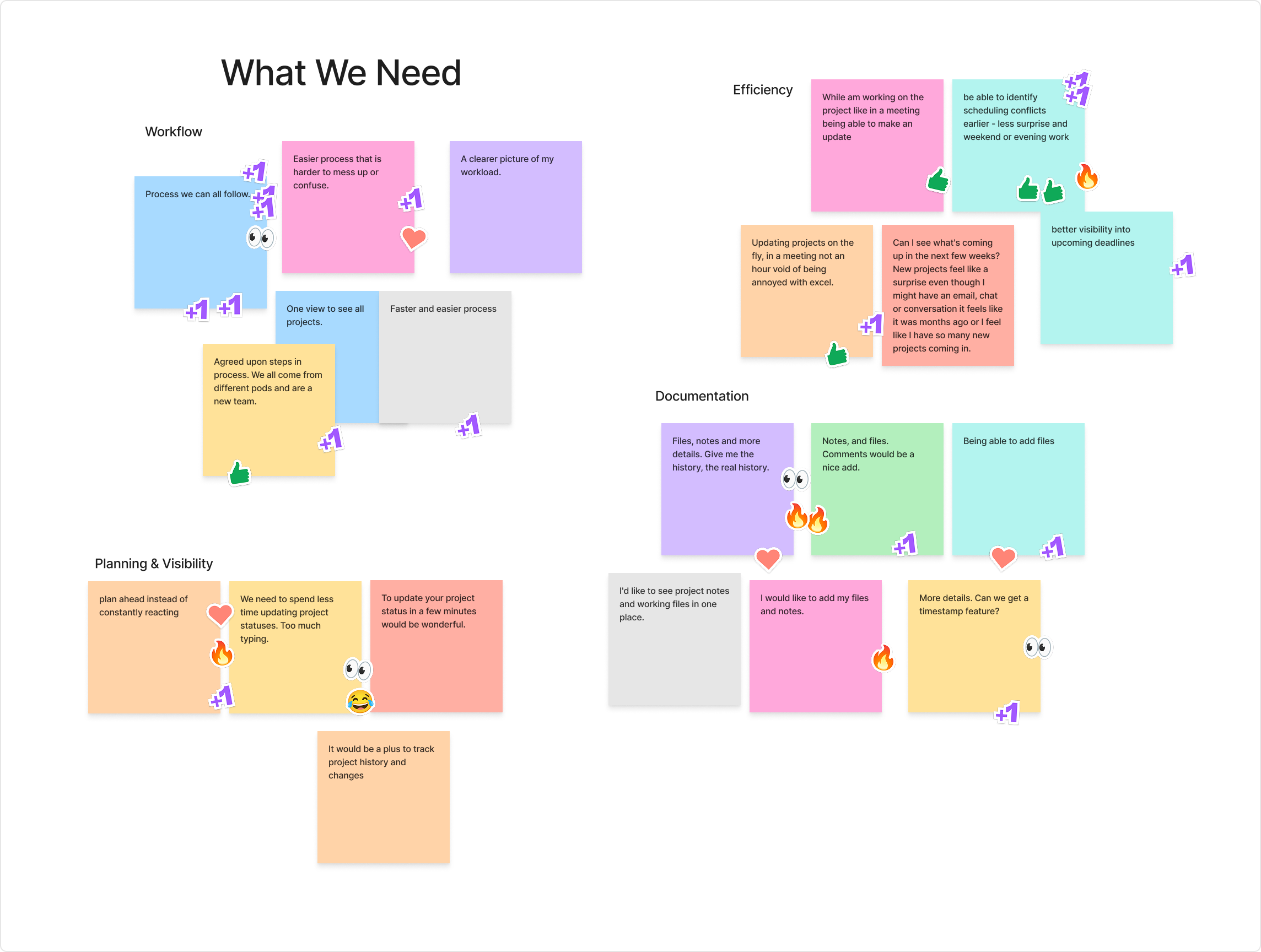
Workshop Part 1: Identifying Operational Challenges
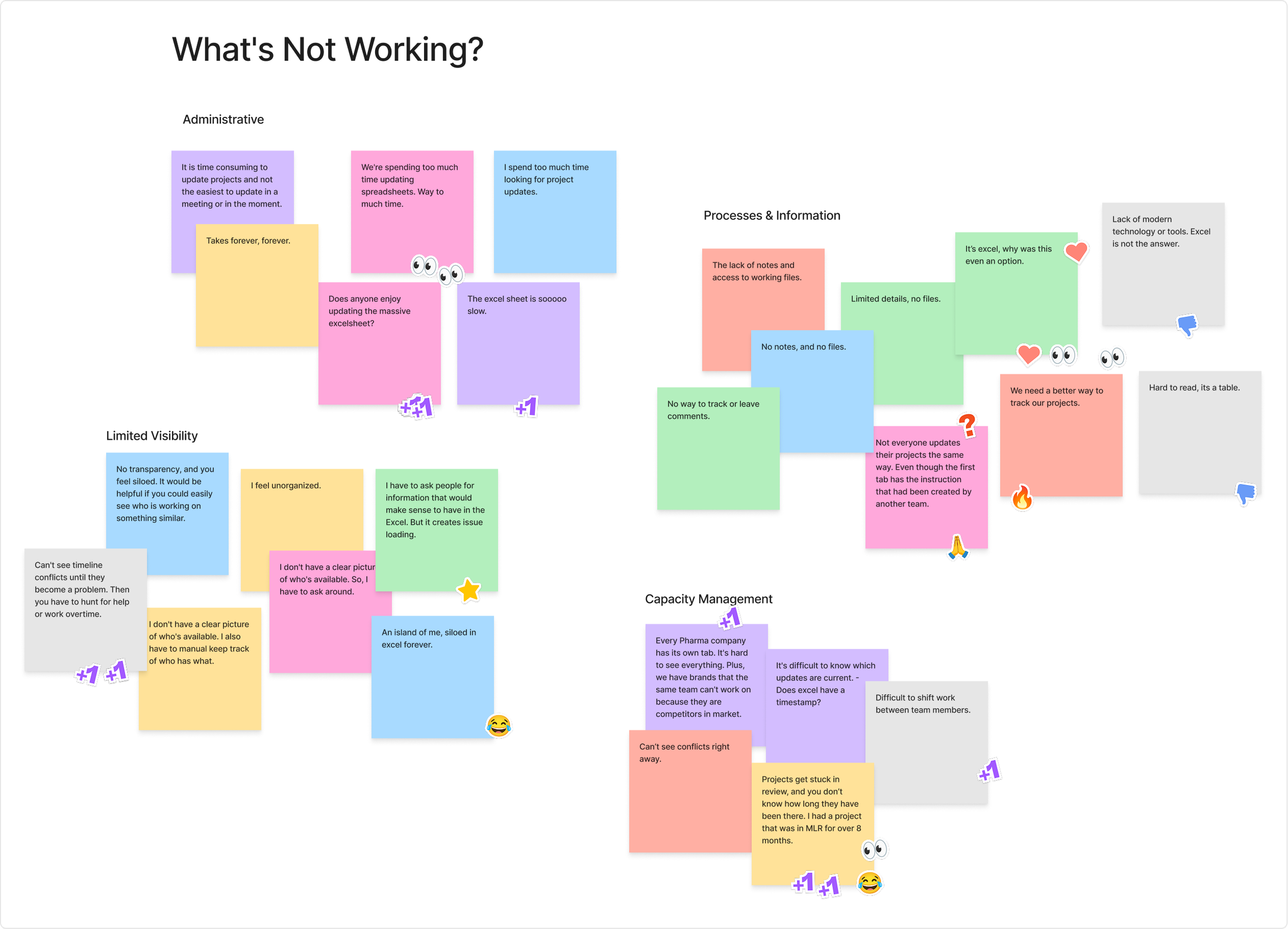
Workshop Part 2: Defining Shared Requirements
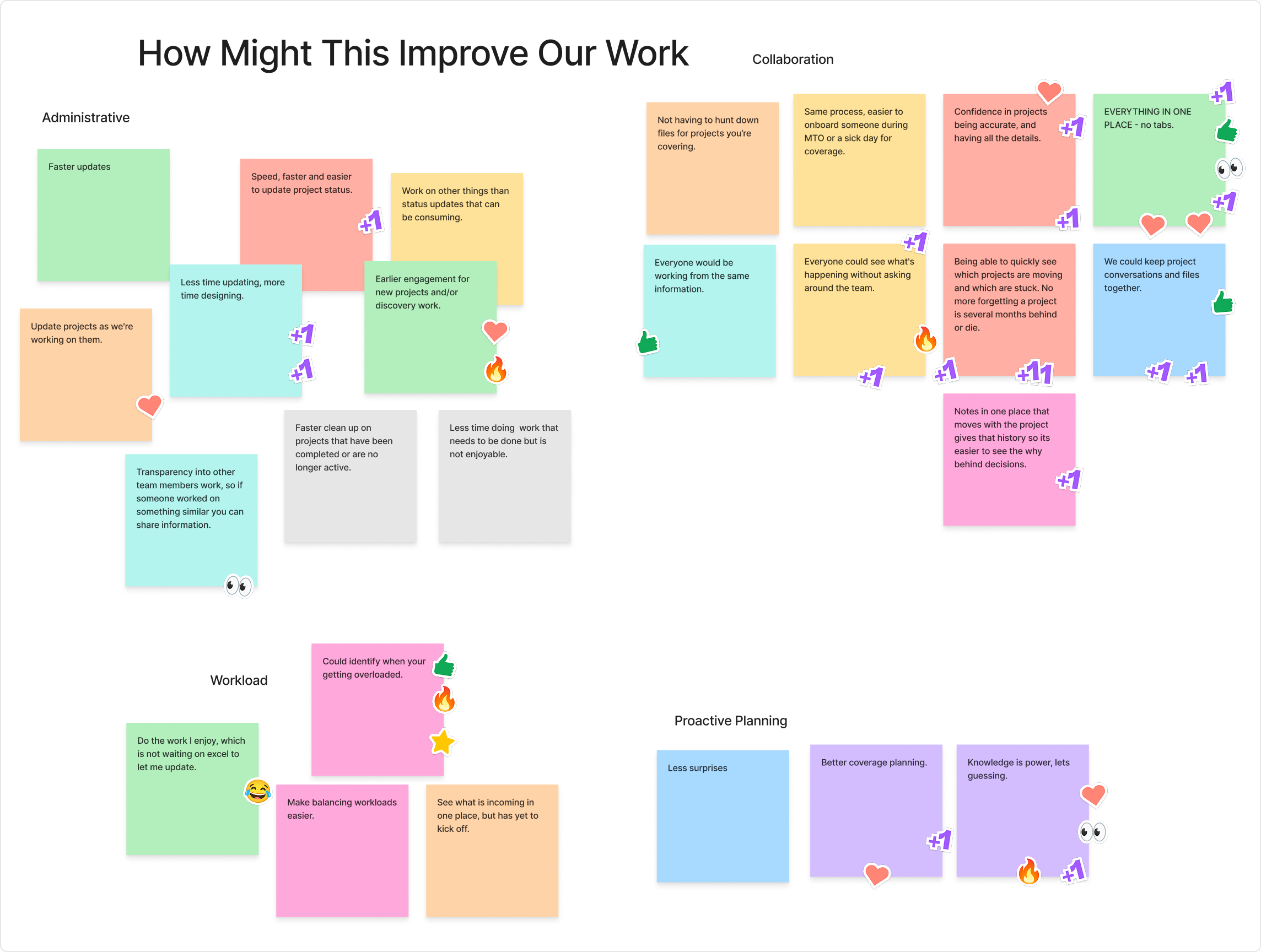
Workshop Part 3: Envisioning Operational Improvements
Standardize Workflows
Drive Team Adoption
Building on the workshop findings, I evaluated our existing enterprise tools and selected Microsoft Planner as a no-additional-cost alternative to Jira. Leveraging several team members' prior experience with Kanban, we established a standardized workflow that simplified onboarding and encouraged adoption across the team.
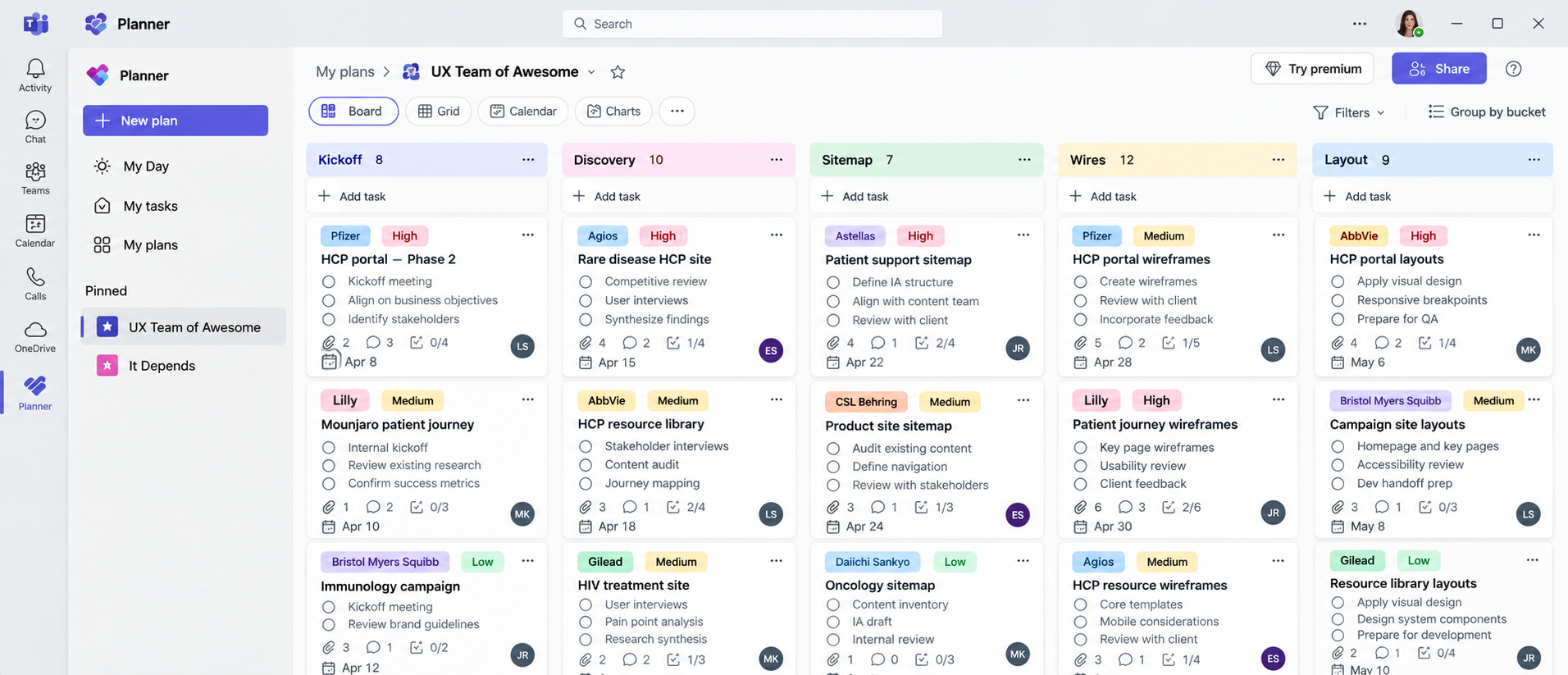
Microsoft Planner Kanban Board
Rather than relying on project counts, I used workflow stages and historical timelines to forecast resource availability. Legal and MLR reviews often created one- to two-week periods of reduced UX activity, allowing us to anticipate capacity, reassign resources, and maximize billable work.
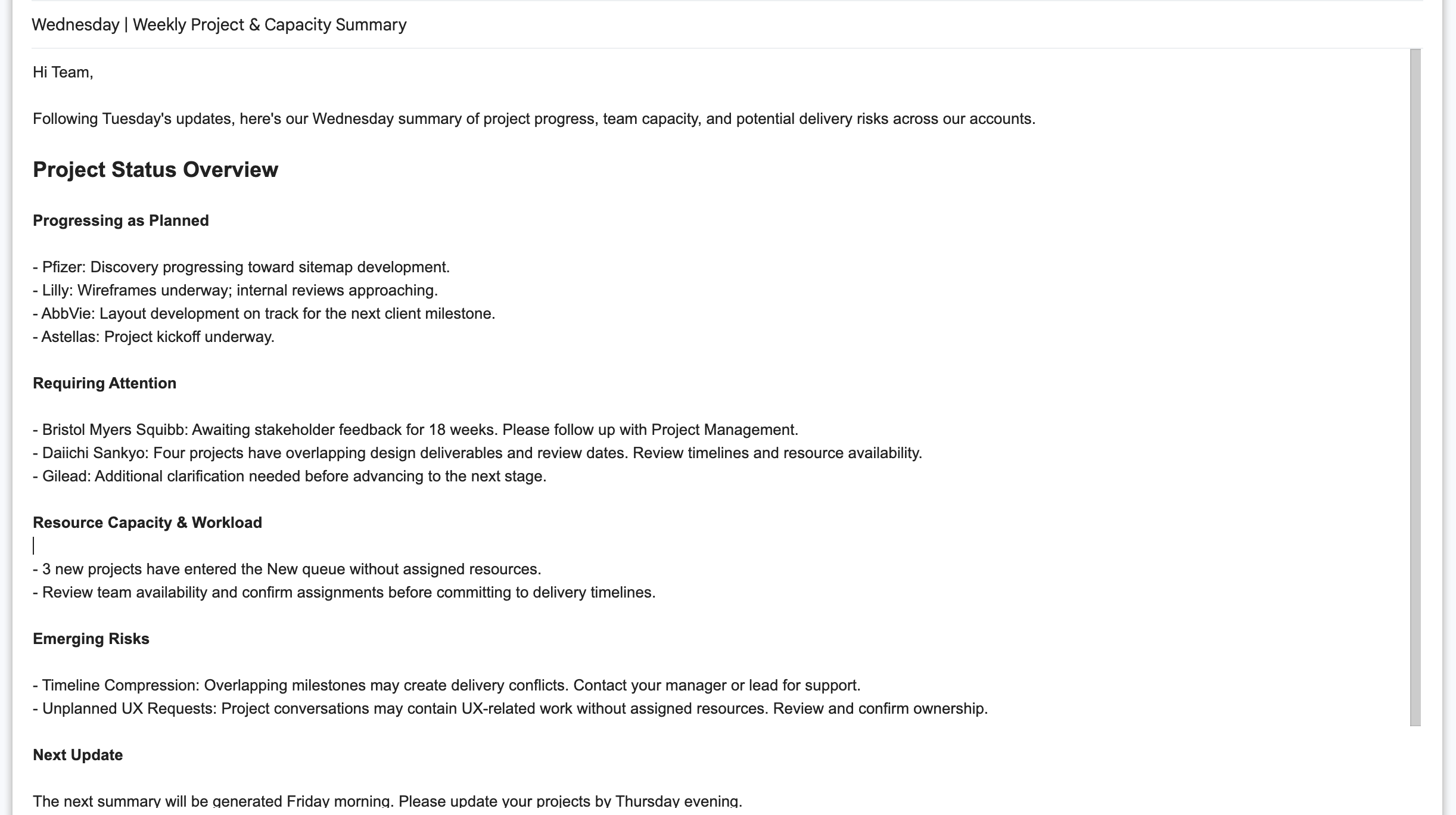
AI-generated email summary using data from the team's Kanban board
Data Governance: Established Tuesday and Thursday updates, with team members accountable for project statuses and documentation.
AI-Powered Reporting: Developed a Microsoft Copilot agent, initially run manually on Wednesdays and Fridays, to summarize workloads, identify patterns, and flag delivery risks.
Workflow Automation: Iteratively refined the agent to retrieve Planner data directly and generate actionable insights with less manual intervention.
Introduce AI to Detect
Missed UX Dependencies
I initially ran AI agents manually to evaluate outputs, identify gaps, and refine instructions using real project data.
After 30 days of testing, I automated reliable workflows, maintaining human oversight while improving efficiency and scalability.
Forecast Capacity Based on Project Stages, Not Counts
I integrated Microsoft Copilot to analyze historical project patterns, forecast capacity constraints, and flag compressed timelines or potential weekend work. AI provided actionable insights, while staffing and prioritization decisions remained with the team to account for project complexity, designer capabilities, and changing business needs.
Augment Decisions, Not Replace Human Judgement
I developed a Copilot Studio agent to identify UX-related discussions in Microsoft Teams, including conversations where our team wasn't tagged. This surfaced potential work earlier, allowing us to coordinate resources, clarify expectations, and prevent scheduling conflicts or delivery delays.
Identify Unassigned Work Before It Is a Delivery Risk
AI-Enabled
Operational Intelligence
Operational Data Sources
AI Intelligence Layer
Project Analysis
Delivery Risk Detection
Capacity Forecasting
UX Opportunity Discovery
Copilot and AI-Assisted Workflows
Portfolio Dashboard, Capacity Trends, Project Health, & Risk Visibility
Human-in-Loop
Reallocate Resources
Review Findings
Prioritize Work
Intervene Early
Learnings
Structure Before Automation
AI is only as effective as the information it receives. Standardizing project tracking in Microsoft Planner created the foundation for reliable AI synthesis, forecasting, and operational visibility.
Human Judgment is Essential
AI surfaced patterns and potential risks, but people made the decisions. Combining automated insights with managerial judgment supported better resource planning and protected team capacity.
Shift from Reactive to Proactive
AI-enabled forecasting helped identify capacity gaps, compressed timelines, and delivery risks earlier, allowing leadership to intervene before issues escalated.
Demonstrate Value to Adopt
Solving a real operational problem with existing tools encouraged other teams to adopt the approach. Demonstrating its value created organizational influence without requiring a top-down mandate.
Explore More
Case Studies
From personalization and GPS-based experiences to extended reality (XR) and enterprise-scale ecosystems, each case study highlights a unique facet of how I lead research, strategy, and user-centered solutions that drive meaningful impact.